0 ratings


Numéro d'article:
69355953
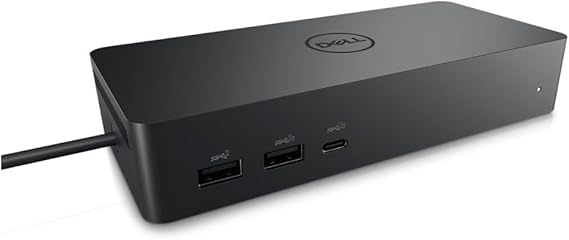
Dell DELL-UD22 UD22 Universal Dock, Black
90% des répondants recommanderaient ceci à un ami
Numéro d'article:
69355953
XAF 145983
Détails du prix
Hors frais de livraison et de douane ( Les frais de livraison et de douane seront calculés lors du paiement )
*Tous les articles seront importés depuis États-Unis
0 ratings
Écrire un commentaire
En stock
 Importé depuis la boutique USA
QTY:
Commandez maintenant et recevez votre commande aux alentours du Monday, Novembre 09
Transaction sécurisée
Ubuy s'engage à protéger votre sécurité et votre confidentialité. Notre système avancé de sécurité des paiements garantit la confidentialité en chiffrant vos informations lors de la transmission grâce aux protocoles AES (Advanced Encryption Standards) et SSL (Secure Socket Layer). Vos coordonnées de paiement sont 100 % sécurisées car nous ne partageons pas vos informations de paiement avec des vendeurs tiers.
Nos meilleurs partenaires logistiques


Livraison
rapide

Retour
gratuit*

Emballage sécurisé

Produits 100 % originaux

Conformité PCI DSS

Certifié ISO 27001



Note: Step Down Voltage Transformer required for using electronics products of États-Unis store (110 V-120 V). Recommended power converters Acheter maintenant.


Ce qui se démarque
Versatile Connectivity
The Dell Universal Dock UD22 supports multiple device connections, offering HDMI, USB-C, and Ethernet ports, enabling seamless integration with various laptops and peripherals for enhanced productivity.
High-Resolution Support
This dock provides dual 4K display capabilities, ensuring high-resolution performance for graphic-intensive tasks, ideal for professional users seeking superior visual experiences without compromising on speed.
Compact Design
The sleek and compact form factor of the UD22 ensures efficient desk space usage, appealing to users in home offices or collaborative workspaces who value aesthetics alongside functionality.
Détails du produit
| Hardware Interface | HDMI, USB 3.0 Type A |
| Compatible Devices | Monitors |
| Total Usb Ports | 6 |
| Number of Ports | 10 |
| Total Number of HDMI Ports | 1 |
| Wattage | 130 |
| Item Dimensions L x W x H | 6.54"L x 1.26"W x 2.99"H (16.6 x 3.2 x 7.6 cm) |
| Item Weight | 14.7 ounces (416.75 grams) |
| Color | Black |
| Brand | Dell |
| Number of Items | 1 |
| Number of Packs | 1 |
| Unit Count | 1 Count |
| UPC | 884116431442 |
| Manufacturer | Dell Computers |
| Built-In Media | Item |
| Model Number | Dell-UD22 |
| Mfr Part Number | 210-BEXR |
| Total USB Ports | 6 |
| Product Dimensions (L x W x H) | 6.54"L x 1.26"W x 2.99"H (16.6 x 3.2 x 7.6 cm) |
| Total HDMI Ports | 1 |
À qui est-ce destiné ?

-
Remote Workers
Ideal for remote workers needing multiple connections for monitors and peripherals, enhancing productivity and workspace organization.
-
Gamers
Great for gamers who require multiple display options and peripheral connectivity for an immersive gaming experience.
-
Content Creators
Perfect for content creators who need to connect various devices and displays for multitasking during editing and production.

-
Minimalists
Not suitable for users who prefer a minimal setup, as it adds multiple connections and devices to their workspace.
DESCRIPTION DU PRODUIT
Dell DELL-UD22 UD22 Universal Dock, Black
Vous avez une question ? Chattez avec nous
Questions et réponses des clients
-
question:
Comment acheter Dell DELL-UD22 UD22 Universal Dock, Black en ligne sur Ubuy ?
répondre: Il est facile d'acheter Dell DELL-UD22 UD22 Universal Dock, Black en ligne sur Ubuy.. Il vous suffit de rechercher le produit, de choisir votre mode d'expédition lors du paiement et de le faire livrer à votre emplacement. -
question:
Dell DELL-UD22 UD22 Universal Dock, Black est-il disponible pour effectuer des achats en ligne à Gabon ?
répondre: Oui, chez Ubuy Gabon, ce produit est disponible pour vous à un prix raisonnable.. Le Dell DELL-UD22 UD22 Universal Dock, Black n'est pas disponible localement mais vous pouvez nous faire confiance avec nos services d'expédition express. -
question:
Combien de temps faut-il pour obtenir le produit après avoir passé la commande ?
répondre: Le délai de livraison de votre produit commandé varie en fonction de ce que vous avez commandé et de la méthode d'expédition que vous avez choisie.. Le délai de livraison estimé est mentionné lors du processus de commande, alors soyez insouciant lors de vos achats.
Dell Docking Stations Dell-UD22 Editorial Review
Dell DELL-UD22 UD22 Universal Dock, Black is an essential accessory for modern laptops with limited ports, providing an array of connectivity options including HDMI, USB-C, and RJ-45 gigabit ports. Users have praised its ability to connect multiple computers seamlessly to monitors, showcasing its versatility for both Windows PCs and MacBook systems. The dock's impressive power delivery capability, offering up to 96W via USB-C, further enhances its utility in professional and home environments. Although some users mentioned intermittent connectivity issues with peripherals like mice and speakers, the overall consensus is that this dock offers a practical solution to expand connectivity and efficiency.
Avis et évaluations clients
1 évaluations des clients
-
5 étoile
100%
-
4 étoile
0%
-
3 étoile
0%
-
2 étoile
0%
-
1 étoile
0%
Donnez votre avis sur ce produit
Partagez votre avis avec d'autres clients
Avantages
- Multiple connectivity options including HDMI and USB-C ports
- Seamless connection for dual computer setups
- Provides adequate power delivery for laptops
- Compact design fits easily into any workspace
- Durable build quality ensures longevity
CONFIANCE EN LA PLATEFORME & PROTECTION DE L'ACHETEUR

BS
Beat
Acheteur vérifié
“Simple process, tax and import duties announced by email. Paid online. Delivery was quick. Can recommend.”
22 October 2026 · via Trustpilot
S
Songpon
Acheteur vérifié
“The product met my expectations perfectly. The ordering process was convenient and easy, and I was kept updated on the delivery status throughout the shipping process. The delivery was also very fast. I can confidently confirm that Ubuy provides an excellent shopping and delivery experience. Highly recommended! From Thailand”
22 October 2026 · via Trustpilot
D
Dimitra
Acheteur vérifié
“Quick and efficient delivery and the possibility to get the package delivered from a pick-up point. I'm very happy with my experience and would recommend it again!”
22 October 2026 · via Trustpilot
HJ
Heer
Acheteur vérifié
“My product came in good condition from the USA. I was happy that I could buy via this Chanel and that DHL brought it to my house. The communication is fine. The charger works very well. Fast and my Samsung watch and Samsung airbuds and Samsung Fold 8 Ultra all charge fast.”
22 October 2026 · via Trustpilot
SF
Sergey
Acheteur vérifié
“Hello Ubuy team, thank you so much for the excellent service! I received the package today; it arrived in great condition and was packed very neatly. The delivery was fast, and the courier was very friendly as well. Wishing continued success to Ubuy and the entire team!”
23 October 2026 · via Trustpilot
POURQUOI ACHETER CHEZ NOUS
Paiement sécurisé
Global Delivery
Retours faciles
Genuine Products
Historique des prix du produit
Informations importantes
- Limitations : Pour les produits expédiés à l'international, veuillez noter que toute garantie du fabricant peut ne pas être valide ; les options de service du fabricant peuvent ne pas être disponibles ; les manuels, instructions et avertissements de sécurité des produits peuvent ne pas être dans les langues du pays de destination ; les produits (et les matériaux qui les accompagnent) peuvent ne pas être conçus conformément aux normes, spécifications et exigences d'étiquetage du pays de destination ; et les produits peuvent ne pas être conformes à la tension et aux autres normes électriques du pays de destination (nécessitant l'utilisation d'un adaptateur ou d'un convertisseur le cas échéant). Il incombe au destinataire de s'assurer que le produit peut être importé légalement dans le pays de destination. En cas de commande auprès d'Ubuy ou de ses filiales, le destinataire est l'importateur officiel et doit se conformer à toutes les lois et réglementations du pays de destination.
- Tous les produits listés sur Ubuy ne sont pas à vendre, Ubuy étant un moteur de recherche mondial. Les produits sont soumis aux réglementations en matière d'exportation et de commerce.
XAF 145983
Commandez maintenant et recevez votre commande aux alentours du Monday, Novembre 09
This item is not restrict in my country.(Please click on above link if this item is not restrict in your country, So our team will review and allow.)
QTY:
Transaction sécurisée
Conforme PCI DSS et certifié ISO 27001:2022, avec des paiements chiffrés et une protection complète de l'acheteur pour chaque commande.
Nos meilleurs partenaires logistiques
Livraison transfrontalière la plus rapide
Assurance Ubuy
Profitez d'une expérience d'achat sereine avec des produits 100 % originaux, une sécurité de paiement conforme PCI DSS, une protection des données certifiée ISO 27001, la livraison transfrontalière la plus rapide, les retours gratuits* et un emballage sécurisé pour chaque commande.