0 ratings




Numéro d'article:
112188528
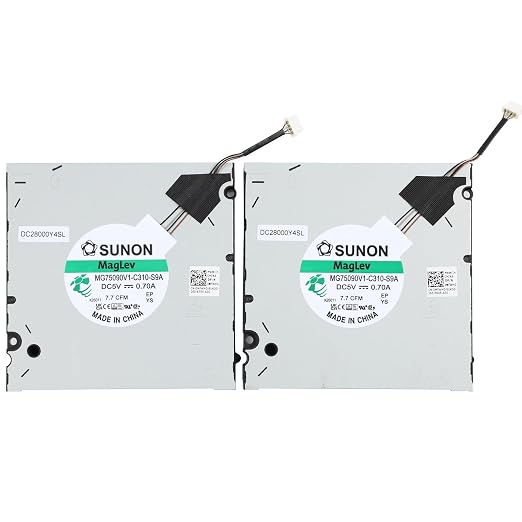
New CPU and GPU Cooling Fan Replacement for DELL Precision 7670 M7670 7680 RTX A5500 Series Laptop MG75090V1-C310-S9A 0MFWHG DC28000Y4SL DC5V 0.7A Fan
Numéro d'article:
112188528
XAF 38885
Price Details
Excluding Shipping & Custom charges ( Shipping and custom charges will be calculated on checkout )
*All items will import from États-Unis
8%
0 ratings
Écrire un commentaire
En stock
 Importé depuis la boutique USA
QTY:
Commandez maintenant et recevez votre commande aux alentours du Mercredi, Juin 24
Transaction sécurisée
Ubuy s'engage à protéger votre sécurité et votre confidentialité. Notre système avancé de sécurité des paiements garantit la confidentialité en chiffrant vos informations lors de la transmission grâce aux protocoles AES (Advanced Encryption Standards) et SSL (Secure Socket Layer). Vos coordonnées de paiement sont 100 % sécurisées car nous ne partageons pas vos informations de paiement avec des vendeurs tiers.
nos meilleurs partenaires logistiques


Replacement new CPU and GPU cooling fan will allow you to use the laptop to run stably and comfortably, fast cooling, low noise.

Livraison
rapide

Retour
gratuit*

Emballage sécurisé

Produits 100 % originaux

Conformité PCI DSS

Certifié ISO 27001


Note: Step Down Voltage Transformer required for using electronics products of États-Unis store (110-120). Recommended power converters Acheter maintenant.


Ce qui se démarque
Efficient Cooling Design
This fan replacement offers optimal airflow to keep your DELL Precision systems cool during intense workloads, preventing overheating and enhancing performance.
Compatibility Assurance
Specifically designed for DELL Precision 7670, M7670, and 7680 A5500 series, ensuring seamless integration and reliability compared to generic alternatives.
Low Noise Operation
Engineered for quiet performance, this fan minimizes disruptive noise levels, creating a more pleasant working environment without sacrificing cooling efficiency.
Détails du produit
- 1.Compatible model: New CPU+GPU Cooling Fan Replacement for for DELL Precision 7670 M7670 7680 RTX A5500 Series laptop. (Please note: Not for RTX A1000 A2000 Series, Not for: MG75070V1-C730-S9A)
- 2.P/N: MG75090V1-C310-S9A 0MFWHG MFWHG DC28000Y4SL
- 3.Package include: 2 × Cooling Fan, 4 wires / 4 pins connector, DC5V 0.70A
- 4.Replacement new CPU and GPU cooling fan will allow you to use the laptop to run stably and comfortably, fast cooling, low noise, create a noise-free & interference-free environment for you.
- 5.Please check the compatible models before purchasing, carefully check the displayed picture and fan code to make sure it is the same as your needs. If you have any questions, please feel free to contact us, Thank you very much!
| Power Connector Type | 4-Pin |
| Voltage | 5 Volts |
| Wattage | 3.5 watts |
| Cooling Method | Air |
| Compatible Devices | Laptop |
| Noise Level | 30 Decibels |
| Maximum Rotational Speed | 6000 RPM |
| Material Type | Metal, Plastic |
| Brand Name | YAEHUYING |
| Manufacturer | YAEHUYING |
| Number of Items | 2 |
| Model | DELL Precision 7670 M7670 7680 FAN |
| Part Number | 7670 M7670 7680 |
| Included Components | 2 × Cooling Fan |
| Brand | YAEHUYING |
| Material | Metal, Plastic |
| Package Weight | 1 Pound |
What's in the box
2 × Cooling Fan
À qui est-ce destiné ?

-
Precision Users
Ideal for DELL Precision 7670 and 7680 users needing efficient cooling to maintain optimal performance during heavy tasks.
-
Gaming Enthusiasts
Great for gamers wanting to ensure their laptop remains cool during intense gaming sessions to prevent overheating.
-
Professional Designers
Suitable for designers requiring reliable cooling solutions while running demanding software, ensuring smooth operation without thermal throttling.

-
Casual Users
Not necessary for users with light computing needs who do not experience heating issues with standard cooling fans.
-
Older Models
Incompatible with older DELL models; designed specifically for Precision 7670 and 7680 series, limiting its usability elsewhere.
-
Budget-Limited Users
Users on a tight budget may find this replacement fan costly compared to potential alternatives available in the market.
DESCRIPTION DU PRODUIT
Vous avez une question ? Chattez avec nous
Questions et réponses des clients
-
question:
What is the compatibility of the New CPU and GPU Cooling Fan for DELL Precision 7670?
répondre: The New CPU and GPU Cooling Fan Replacement is specifically designed for the DELL Precision 7670, M7670, 7680, and A5500 Series laptops. This means it fits perfectly into these models, ensuring optimal cooling performance and device longevity. Using this fan replacement is crucial for maintaining your laptop's thermal management system, especially during high-performance tasks like gaming or video editing, where overheating can lead to system throttling and hardware damage. -
question:
How do I know if my cooling fan needs replacement?
répondre: If you notice your laptop overheating, unusual noise from the fan, or the system shutting down unexpectedly, it may be time to replace your cooling fan. Furthermore, decreased performance during high loads is a sign that the cooling system isn't functioning properly. Regularly monitoring your system temperatures using software tools can also help identify overheating issues early, allowing you to take action before more serious damage occurs. -
question:
What are the specifications of the replacement cooling fan?
répondre: The replacement fan features the model number MG75090V1-C310-S9A, operates at DC5V with a current rating of 0.7A, and includes a DC28000Y4SL designation. These specifications ensure that it meets the power requirements of your DELL laptop while providing efficient cooling. It is essential to match these specifications to guarantee compatibility and performance, thus avoiding any potential issues during installation or operation. -
question:
How do I install the cooling fan in my DELL Precision 7670?
répondre: Installing the cooling fan involves a few straightforward steps: first, make sure your laptop is powered off and disconnected from any power source. Carefully remove the back panel of your laptop using a screwdriver, disconnect the old fan, and then position the new fan in place. Secure it with screws, reconnect the power cable, and replace the back panel. It’s recommended to follow a detailed installation guide or video for visual aid to ensure smooth installation without damaging any components. -
question:
What should I do if my new fan is not functioning properly?
répondre: If the new fan is not functioning, first double-check the installation process and ensure all connections are secure. It could be a loose connector or improperly seated fan. Also, check if the laptop is receiving power correctly. If everything appears fine but the fan is non-operational, consider returning it for a replacement as it may be defective. Always double-check the compatibility with your laptop model to ensure it is the correct part. -
question:
Is it advisable to replace the CPU and GPU cooling fan on my own?
répondre: Yes, replacing the CPU and GPU cooling fan can be a manageable task for those familiar with basic hardware handling. It is essential to have the right tools, including a screwdriver set and possibly anti-static wrist straps to avoid damaging components. However, if you are unsure, seeking help from a professional technician or service center is advisable to prevent any inadvertent damage during the installation process. -
question:
How can I maintain my laptop's cooling system after replacing the fan?
répondre: To maintain your laptop's cooling system, regularly clean the fan and air vents to prevent dust and debris buildup, which can impede airflow. Use compressed air to blow out dust periodically. Additionally, monitor your laptop's temperature and performance during intensive tasks. Ensuring good ventilation during use, avoiding soft surfaces, and using a cooling pad can help extend the life of your cooling system. -
question:
Will using an aftermarket cooling fan void my laptop warranty?
répondre: Using an aftermarket cooling fan typically doesn't void your laptop warranty, provided the fan is compatible and you install it correctly. However, any damage caused by improper installation or faulty parts could void warranty claims. Always check with DELL’s warranty guidelines or customer support for specifics related to your warranty to avoid jeopardizing your coverage. -
question:
Can the cooling fan impact my laptop’s overall performance?
répondre: Absolutely, the cooling fan plays a significant role in maintaining optimal operating temperatures for your laptop’s CPU and GPU. A properly functioning fan prevents overheating, ensuring that the laptop can perform at its peak capabilities during resource-heavy tasks. Conversely, a malfunctioning fan can lead to thermal throttling, where the performance significantly drops to avoid damage due to heat, resulting in a poor user experience. -
question:
Where can I buy the New CPU and GPU Cooling Fan Replacement for DELL Precision 7670 in Gabon?
répondre: You can buy the New CPU and GPU Cooling Fan Replacement for your DELL Precision 7670 from Ubuy. Ubuy offers a wide range of electronic components and accessories, ensuring you receive a quality product delivered to your doorstep. Their platform is user-friendly, and you can also find various customer support options if you have any inquiries regarding your purchase.
YAEHUYING CPU Cooling Fans Editorial Review


Aucune critique éditoriale trouvée
Avis et évaluations clients
5 évaluations des clients
-
5 étoile
75%
-
4 étoile
25%
-
3 étoile
0%
-
2 étoile
0%
-
1 étoile
0%
Donnez votre avis sur ce produit
Partagez votre avis avec d'autres clients
Avantages
- Excellent cooling performance
- Whisper-quiet operation
- Easy installation process
- Compatible with multiple models
- Durable and long-lasting
Les inconvénients
- Slightly larger size might require adjustment.
Historique des prix du produit
Informations importantes
- Limitations : Pour les produits expédiés à l'international, veuillez noter que toute garantie du fabricant peut ne pas être valide ; les options de service du fabricant peuvent ne pas être disponibles ; les manuels, instructions et avertissements de sécurité des produits peuvent ne pas être dans les langues du pays de destination ; les produits (et les matériaux qui les accompagnent) peuvent ne pas être conçus conformément aux normes, spécifications et exigences d'étiquetage du pays de destination ; et les produits peuvent ne pas être conformes à la tension et aux autres normes électriques du pays de destination (nécessitant l'utilisation d'un adaptateur ou d'un convertisseur le cas échéant). Il incombe au destinataire de s'assurer que le produit peut être importé légalement dans le pays de destination. En cas de commande auprès d'Ubuy ou de ses filiales, le destinataire est l'importateur officiel et doit se conformer à toutes les lois et réglementations du pays de destination.
- Tous les produits listés sur Ubuy ne sont pas à vendre, Ubuy étant un moteur de recherche mondial. Les produits sont soumis aux réglementations en matière d'exportation et de commerce.
XAF 38885
Commandez maintenant et recevez votre commande aux alentours du Mercredi, Juin 24
This item is not restrict in my country.(Please click on above link if this item is not restrict in your country, So our team will review and allow.)
QTY:
Transaction sécurisée
Ubuy s'engage à protéger votre sécurité et votre confidentialité. Notre système avancé de sécurité des paiements garantit la confidentialité en chiffrant vos informations lors de la transmission grâce aux protocoles AES (Advanced Encryption Standards) et SSL (Secure Socket Layer). Vos coordonnées de paiement sont 100 % sécurisées car nous ne partageons pas vos informations de paiement avec des vendeurs tiers.
nos meilleurs partenaires logistiques
Livraison transfrontalière la plus rapide
Caractéristiques et avantages
- Replaces old CPU and GPU cooling fan for DELL Precision 7670 series.
- Ensures stable and comfortable laptop performance.
- Promotes fast cooling with a maximum speed of 6000 RPM.
- Maintains a low noise level of just 40 dB.
- Comes with everything needed: 2 fans and 4-wire connectors.
- Compatible with various DELL Precision models - check before you buy!