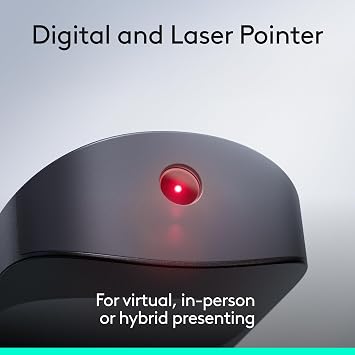
Logitech Spotlight 2 Presentation Remote Wireless Clicker Haptics - Black
Present confidently with haptic feedback that pulses when you press the highlight button.
Logitech Spotlight 2 Presentation Remote Wireless Clicker Haptics - Black
Numéro d'article: 229599107

Logitech Spotlight 2 Presentation Remote Wireless Clicker Haptics - Black

Numéro d'article: 229599107

XAF 106333

Détails du prix

Hors frais de livraison et de douane ( Les frais de livraison et de douane seront calculés lors du paiement )

*Tous les articles seront importés depuis États-Unis

En stock
États-Unis Importé depuis la boutique USA

QTY:

Commandez maintenant et recevez votre commande aux alentours du Mercredi, Septembre 09
Nos meilleurs partenaires logistiques
  • fedex
  • dhl
Present confidently with haptic feedback that pulses when you press the highlight button.
Garantie U-Care :
Aucun
Sélectionnez un forfait
fast shipping

Livraison
rapide

free return

Retour
gratuit*

Emballage sécurisé

Emballage sécurisé

Produits 100 % originaux

Produits 100 % originaux

pci-dss

Conformité PCI DSS

iso certified

Certifié ISO 27001


paypal payment
visa payment
mastercard payment
Note: Step Down Voltage Transformer required for using electronics products of États-Unis store (110-120). Recommended power converters Acheter maintenant.

Ce qui se démarque

Haptic Feedback
Experience precise control with haptic feedback, allowing you to feel each action, ensuring your presentations flow smoothly without distracting interruptions.
Digital Highlighting
Engage your audience with digital highlighting that lets you emphasize key points directly on the screen, making your presentation more interactive and impactful.
Customizable Actions
Tailor your remote to suit your style with customizable actions for buttons, enhancing your efficiency and empowering you to present seamlessly.

Détails du produit

Shop Logitech Spotlight 2 Presentation Remote Wireless Clicker Haptics - Black online at a best price in Gabon. B0H4QVHG95
Package Weight1 Pound

À qui est-ce destiné ?

Suitable For
  • Professional Presenters

    Ideal for professionals who regularly give presentations, enhancing their delivery with seamless control and effective engagement.

  • Educators

    Perfect for teachers and trainers who need to convey information clearly while managing slides and highlighting content effectively.

  • Remote Workers

    Useful for remote workers conducting virtual meetings, allowing easy navigation of slides and content sharing without distractions.

Not Suitable For
  • Casual Users

    Not suited for casual users or infrequent presenters who may find its features overwhelming or unnecessary.

DESCRIPTION DU PRODUIT

Logitech Spotlight 2 Presentation Remote Wireless Clicker Haptics - Black

Vous avez une question ? Chattez avec nous

Questions et réponses des clients

  • question: What features does the Logitech Spotlight 2 Presentation Remote offer?

    répondre: The Logitech Spotlight 2 Presentation Remote includes digital highlighting, customizable actions, and a built-in laser pointer. It allows users to highlight areas of their presentation in real-time, making it easier to capture the audience's attention. With Bluetooth and USB-C connectivity, it supports a wide range of devices, ensuring flexibility during presentations. The quick charge feature also benefits users who need to recharge quickly, giving them more time to focus on their content rather than on battery life.
  • question: How does the quick charge feature work on the Logitech Spotlight 2?

    répondre: The quick charge feature on the Logitech Spotlight 2 allows users to get up to an impressive three hours of usage with just a one-minute charge. This is particularly useful in scenarios where time is limited, such as when a presenter is running late or a last-minute meeting is called. Charging through USB-C not only speeds up the process but also means you can use the remote with various modern devices.
  • question: Is the Logitech Spotlight 2 compatible with all devices?

    répondre: Yes, the Logitech Spotlight 2 is designed to be compatible with a wide range of devices, including Windows, macOS, and most presentation software. It connects via Bluetooth or USB receiver, making it versatile for use with laptops, desktops, and even some tablets. This flexibility makes it ideal for professionals who switch between different devices during their presentations.
  • question: Can I customize the actions on the Logitech Spotlight 2?

    répondre: Absolutely! The Logitech Spotlight 2 allows for customizable actions, enabling users to configure the buttons according to their preferences and presentation needs. Users can assign specific functions such as advancing slides, going back, or launching applications. This feature enhances the user experience, allowing presenters to streamline their workflow and focus on delivering engaging content.
  • question: How does the haptic feedback feature enhance presentations?

    répondre: The haptic feedback feature of the Logitech Spotlight 2 provides subtle vibrations to signal successful clicks or actions. This sensory feedback allows presenters to maintain focus on their content instead of visually checking their remote. Especially during crucial moments in a presentation, this feature helps users stay on track and enhances the overall engagement by allowing more seamless interactions without distractions.
  • question: What is digital highlighting and how is it used?

    répondre: Digital highlighting is a remarkable feature of the Logitech Spotlight 2 that allows presenters to highlight areas on their screen or documents during a presentation. By using different colors, users can draw attention to specific data points or visuals, making their arguments more persuasive. This feature is particularly effective in educational settings or business meetings where clarity and emphasis on key information are essential.
  • question: How should I set up the Logitech Spotlight 2 for my presentations?

    répondre: Setting up the Logitech Spotlight 2 is straightforward. First, ensure the remote is charged and connect it via Bluetooth or the included USB receiver to your device. Next, download the Logitech Presentation app to access customization options and set up your preferred actions. Once configured, you can practice using the remote to get comfortable with its functionalities. This preparation will enhance your confidence and effectiveness when you deliver your presentation.
  • question: Is the Logitech Spotlight 2 easy to carry around?

    répondre: Yes, the Logitech Spotlight 2 is designed with portability in mind. Its lightweight and compact design make it easy to carry in a pocket or bag, making it an ideal companion for presenters who travel frequently. Whether you are heading to a conference or a client meeting, the device is convenient and accessible, ensuring you’re always prepared.
  • question: How does the laser pointer function of the Logitech Spotlight 2 work?

    répondre: The laser pointer function on the Logitech Spotlight 2 allows presenters to direct attention to specific parts of their visuals or documents. With a simple press of a button, the laser pointer highlights critical areas without disruptively obstructing the view. This feature is essential for conveying complex information clearly, particularly during technical discussions where precise data presentation is vital.
  • question: Where can I buy the Logitech Spotlight 2 Presentation Remote in Gabon?

    répondre: You can purchase the Logitech Spotlight 2 Presentation Remote Wireless Clicker Haptics from Ubuy in Gabon. Ubuy offers a convenient shopping experience with access to a wide selection of Logitech products, ensuring that you find the exact item you need for your presentations. Browsing their platform allows you to compare features, read reviews, and securely complete your purchase.

Logitech Presentation Remotes Editorial Review

Logitech Spotlight 2 Presentation Remote Wireless Clicker Haptics - Black is a sophisticated tool designed for impactful presentations. Featuring digital highlighting, customizable actions, and a built-in gyroscope for smooth cursor control, this remote ensures a polished delivery for both in-person and virtual audiences. With modern USB-C fast charging, it provides several hours of power from a brief charge. Users appreciate the haptic feedback that confirms actions, eliminating the need to look down during presentations. However, to unlock advanced features like digital zooming, the host must install Logitech’s Presentation app, which can be a limitation in certain corporate environments. Overall, it's ideal for professionals looking to enhance their presentation experience.

Avis et évaluations clients

1 évaluations des clients
  • 5 étoile
    100%
  • 4 étoile
    0%
  • 3 étoile
    0%
  • 2 étoile
    0%
  • 1 étoile
    0%

Donnez votre avis sur ce produit

Partagez votre avis avec d'autres clients

Avantages

  • Digital highlighting enhances visibility during presentations
  • Gyroscope control for interactive presentations
  • USB-C fast charging allows quick power-ups
  • Silent haptic feedback aids time management
  • Compatible with PCs and Macs for versatility

Les inconvénients

  • A protective case is not included for transport.

CONFIANCE EN LA PLATEFORME & PROTECTION DE L'ACHETEUR

trustpilot logo
4.2/5 9250 + reviews
Lire les avis
MA
Mohammad
Acheteur vérifié

“Excellent quality and original too,when ubuy send original things I will appreciate that ,I very satisfied thank you”

23 July 2026 · via Trustpilot
CK
Chitra
Acheteur vérifié

“The order and delivery progress was communicated very well. Package arrived within the estimated time. Products arrived as expected in good condition.”

22-Jul-26 · via Trustpilot
K
kund
Acheteur vérifié

“Good supply of products. Safe payment methods, and shipment worldwide! Genuine products.”

23-Jul-26 · via Trustpilot
OO
Onesi
Acheteur vérifié

“Was my first time buying a product from Ubuy, but I found it so helpful. This is reliable. Gonna place a new order!”

22 July 2026 · via Trustpilot
SJ
SAO JOHN
Acheteur vérifié

“Ubuy is a great online platform to buy stuff. Reliable, fast delivery time and great value for money. I've been using Ubuy online shopping platform for three years now and will continue to do so.”

23 July 2026 · via Trustpilot
Paiement sécurisé Global Delivery Retours faciles Genuine Products

Historique des prix du produit

Informations importantes

  • Limitations : Pour les produits expédiés à l'international, veuillez noter que toute garantie du fabricant peut ne pas être valide ; les options de service du fabricant peuvent ne pas être disponibles ; les manuels, instructions et avertissements de sécurité des produits peuvent ne pas être dans les langues du pays de destination ; les produits (et les matériaux qui les accompagnent) peuvent ne pas être conçus conformément aux normes, spécifications et exigences d'étiquetage du pays de destination ; et les produits peuvent ne pas être conformes à la tension et aux autres normes électriques du pays de destination (nécessitant l'utilisation d'un adaptateur ou d'un convertisseur le cas échéant). Il incombe au destinataire de s'assurer que le produit peut être importé légalement dans le pays de destination. En cas de commande auprès d'Ubuy ou de ses filiales, le destinataire est l'importateur officiel et doit se conformer à toutes les lois et réglementations du pays de destination.
  • Tous les produits listés sur Ubuy ne sont pas à vendre, Ubuy étant un moteur de recherche mondial. Les produits sont soumis aux réglementations en matière d'exportation et de commerce.